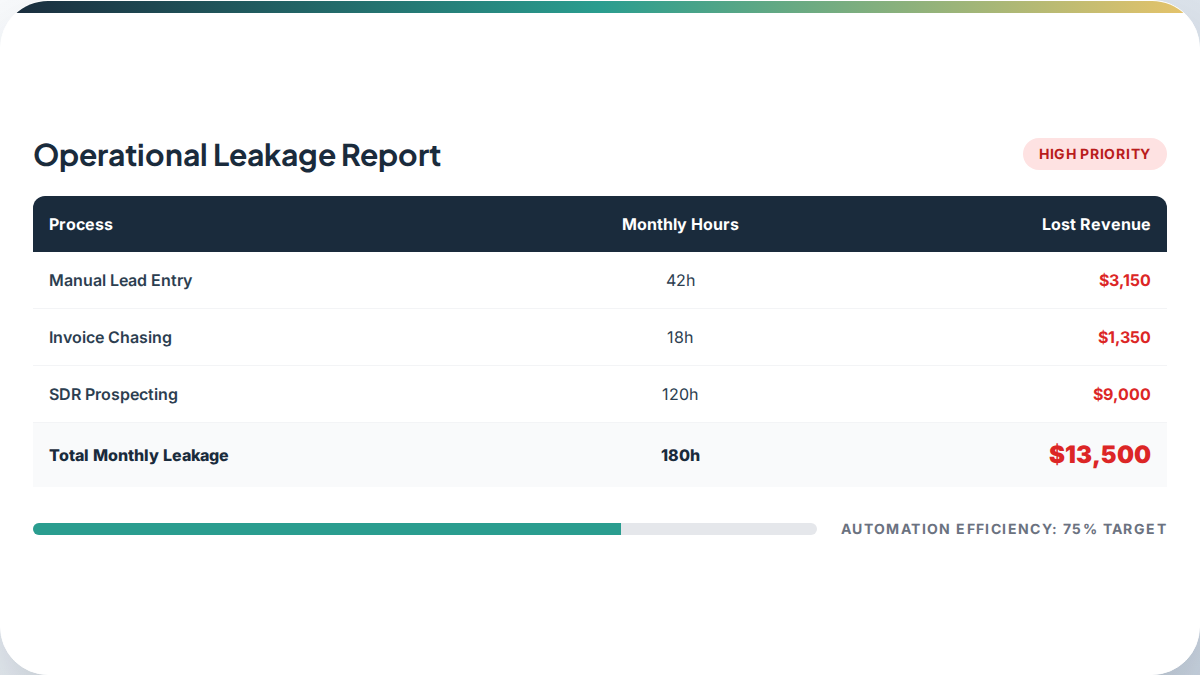
The hidden costs of running your business manually go well beyond wages. Most leadership teams only see payroll as the cost of a human-centered workflow. They miss the opportunity cost of slow decision-making and the compounding drag of unstructured data sitting in spreadsheets and inboxes. Manual operations aren't just inefficient - they're a quiet, ongoing tax on your growth.
What Manual Operations Actually Cost
When businesses audit where their time goes, they typically find a few categories of work that consume hours every week without producing direct value: data entry, report summarizing, lead routing, approval chains, and repetitive internal communication. Each of these feels like a small cost in isolation. Together, they can represent 20 to 30 percent of your team's available hours.
The more subtle cost is what your team could be doing instead. Strategic thinking, customer relationships, product improvement - these are the activities that actually build a business. Every hour spent on low-value repetitive work is an hour not spent on that.
The Problem with Invisible Workflows
Manual workflows tend to be invisible to leadership because they happen in the gaps between systems. Someone exports a report from one tool, reformats it, and pastes it into another. Someone else manually routes a new lead to the right salesperson based on territory. A third person re-enters customer data that already exists somewhere else.
None of this appears on an org chart. None of it has a line item in the budget. But it's consuming real time, and it introduces real errors along the way.
The Three Categories of Hidden Cost
1. Cognitive overhead
Every time an employee has to hold a process in their head - remembering which spreadsheet to update, which person to notify, which format to use - that's cognitive overhead. It's tiring, it's error-prone, and it compounds. High cognitive overhead leads to burnout and turnover, which are among the most expensive outcomes a business can face.
HatcherSoft recommends starting with a workflow audit to identify which tasks your team finds mentally draining but procedurally simple. These are the best candidates for automation.
2. Human error variance
Manual data handling introduces inconsistency. A name entered slightly differently in two systems creates a duplicate record. A miscategorized lead goes to the wrong follow-up sequence. A report with an off-by-one error gets sent to a client. These aren't failures of character - they're predictable outcomes of asking humans to do repetitive, detail-intensive work at scale.
Automating data entry and routing removes the variability. The process runs the same way every time, without fatigue affecting the outcome.
3. Competitive lag
Businesses that rely on manual approval chains for every minor decision move slowly. Quotes take longer. Responses take longer. Adjustments take longer. In markets where response time is part of the customer experience, that lag costs deals.
Competitors who have automated their routine decision-making can respond faster, scale without proportionally increasing headcount, and redirect their people toward work that actually requires judgment.
Where to Start
The most effective approach is to start with a clear audit of your current workflows before touching any tools. Map out what actually happens - not what's supposed to happen, but what people actually do every day. Look for:
- Tasks that happen on a fixed schedule (weekly reports, monthly reconciliations)
- Data that moves between systems by hand
- Approval steps that rarely result in a rejection
- Questions your team gets asked repeatedly
Each of these is a candidate for automation. Not all of them need a sophisticated solution - sometimes a simple integration between two existing tools eliminates hours of work per week.
A Realistic 90-Day Starting Point
A practical approach to reducing manual overhead in the first 90 days looks like this:
- Days 1-30: Map every manual workflow. Identify the highest-cost bottlenecks by multiplying time spent by hourly rate. Produce a ranked list of automation candidates.
- Days 31-60: Build and test automation for the top one or two items on that list. Measure the actual time saved against your baseline.
- Days 61-90: Integrate the automation into your team's standard operating procedures. Use the time savings to identify the next round of candidates.
This approach keeps scope manageable and demonstrates value before asking your team to adopt new systems at scale. Getting team buy-in is often the harder part, and it deserves as much attention as the technical setup.
The Goal is Not Full Automation
The goal is to stop paying for work that doesn't require a human. Your team's judgment, relationships, and creativity are valuable. Spreadsheet formatting is not. The more of the latter you can hand off to a system, the more of the former you get to apply to your actual business.
Most growing businesses find that even modest automation - connecting a few tools, removing a few manual steps - frees up meaningful time within weeks. That time compounds. What starts as a few hours per week becomes a structural advantage as the business scales. One trucking company cut $10K per month in call center costs by mapping the problem first and building something targeted rather than expensive. If you're ready to reduce your manual overhead, our operations automation service is a good starting point.